Smart homes for rent are apartments or houses where the landlord has already installed devices such as a smart lock, a smart thermostat and a hub. They can be a nice perk, but the devices usually run on the landlord’s system, so ask who controls them before you sign. If you cannot find a rental with the features you want, you can make almost any rental smart yourself with plug-in and battery devices that need no drilling and move with you.
This guide covers both paths. First, the questions to ask when a listing advertises smart features. Then a step-by-step plan for building your own setup, with a section on green smart home devices for renters that shows what actually saves money. Prices and rates were checked in November 2026 and can change.
Quick answer
- Landlord-installed smart packages usually include a smart lock, thermostat and hub, managed by the property. Ask whose account they run on, whether they are reset between tenants, and whether there is any fee.
- No cameras inside the unit. An outdoor doorbell camera is common. A camera in your living space is a red flag.
- Making your own rental smart takes one voice speaker, a few smart plugs and smart bulbs. Everything is plug-in, so you need no permission and nothing stays behind at move-out.
- Fixture swaps need written permission. That means thermostats, locks, switches and shower heads.
- Energy savings are modest but real. LEDs, scheduled plugs and a smart thermostat or AC controller each save a bit. Worked math is below.
What Smart Homes for Rent Actually Include
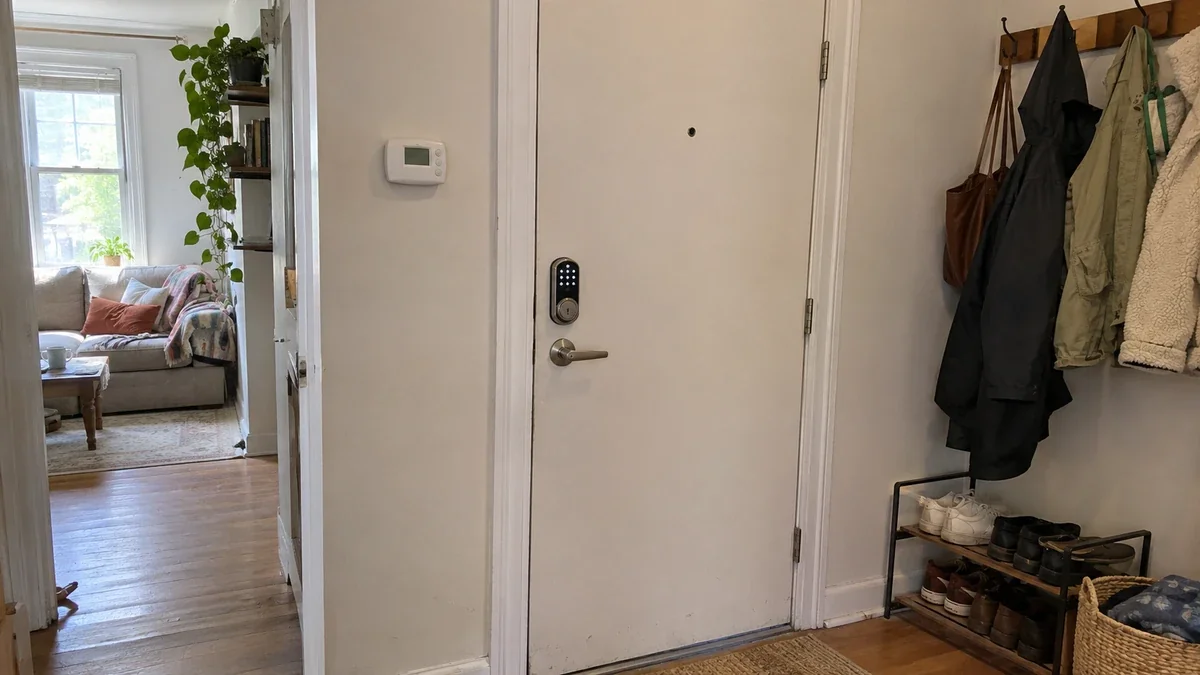
A “smart home” listing is a loose marketing term. In rental housing it most often means a package of devices installed and managed by the property. Companies such as SmartRent sell these systems to landlords. According to SmartRent’s resident pages, the install typically replaces the existing deadbolt with a smart lock and the thermostat with a smart one, and adds a hub that lets the devices talk to a mobile app. Residents then create an account in that app. Other vendors bundle a hub and a thermostat in a single unit, and one vendor says its hub thermostat connects without needing the resident’s Wi-Fi.
What matters to you as a tenant is who owns the system. If the lock, thermostat and hub belong to the property, the property controls the accounts, the schedules and the data. You get access through a resident login, and when you move out, you give it all back.
Typical contents of a smart rental package:
- Smart lock: keyless entry with a code or an app.
- Smart thermostat: schedule and remote control, sometimes with limits set by the property.
- Hub: the box that links the devices to the property’s app.
- Extras (varies): leak sensors, smart light switches, video doorbells, or a building-wide Wi-Fi network.
Search results for this phrase are mostly property listing pages and landlord-side articles. This guide is written from the tenant’s side, which is why the checklist below focuses on control, privacy and move-out.
What to Look For in Smart Homes for Rent – A Tenant Checklist
Use this checklist on any listing that advertises smart features, and read the lease for the same points before you sign. The questions take ten minutes and catch most problems.
| Check | What to ask | Green flag | Red flag |
|---|---|---|---|
| Who controls the devices? | “Whose account are the lock, thermostat and hub on?” | A tenant account handed over at move-in, with the landlord having only admin access | The landlord’s personal account, or “we’ll set that up later” |
| Are devices reset between tenants? | “Were codes and schedules cleared after the last tenant?” | Yes, with a documented reset at turnover | The previous tenant’s codes may still work |
| Are there cameras inside? | Look, and ask directly | None inside the unit | Any camera in the living space, even “only in the hallway” |
| Wi-Fi | “Is Wi-Fi included, and is there a 2.4 GHz band?” | Your own router is allowed, or 2.4 GHz is available | Landlord-controlled Wi-Fi that blocks new devices |
| Lock backup | “If the batteries die, how do I get in?” | A physical key, or a keypad with a code you control | App-only entry with no key |
| Lease wording | Search the lease for “smart”, “camera”, “device” and “technology” | Clear rules on what you may add | A ban on “alterations” with no exception for plug-in devices, or a mandatory monthly smart fee |
| Thermostat control | “Can I set my own schedule? Can I swap it and restore it?” | Yes, in writing | Locked to a schedule you cannot change |
| Move-out | “What do I reset, and what do you reset?” | Written steps for both sides | Nothing in writing |
Three of these matter most. First, cameras: an outdoor doorbell camera is normal, but a camera inside your unit is a privacy problem, and you should ask for it to be removed in writing before you sign. Second, accounts: a smart lock on the landlord’s personal account can lock you out if they change a setting. Third, fees: ask whether the smart package is optional, what exactly it includes, and what it costs per month. A fee for devices you cannot control is rent for the landlord’s equipment. If this comes up in your lease, a local tenant organization can tell you what is reasonable where you live. For lock rules in particular, see Can Renters Change the Locks? Rules, Rights & Safe Options.
Rent a Smart Home or Make Your Rental Smart?
Both paths work, and they trade convenience against control.
| Rent a smart home | Make your rental smart | |
|---|---|---|
| Upfront cost | Often $0, but the package can be built into rent | Roughly $100 to $200 for a starter setup |
| Who controls it | Usually the property | You |
| At move-out | You leave it all behind | You pack it and set it up again |
| Privacy | The property may see lock logs and thermostat history | Your accounts and data |
| Risk | Devices can be disabled or tied to fees you do not control | You own the fix as well as the risk |
| Best for | People who want zero setup and accept the trade-offs | Most renters, especially frequent movers |
If a smart rental costs the same as comparable non-smart places, take the free features and ask the checklist questions. If it carries a mandatory fee, be cautious. Either way, you can add your own plug-in devices on top, and that is what the next section covers. For a shopping list of first purchases, see Smart Home for Renters: What to Buy First (No Drilling).
How to Make Any Rental Smart, Step by Step
You do not need a hub, a plan, or a weekend. You need one voice speaker and an afternoon, and then you add rooms one at a time. This order makes each step easier.
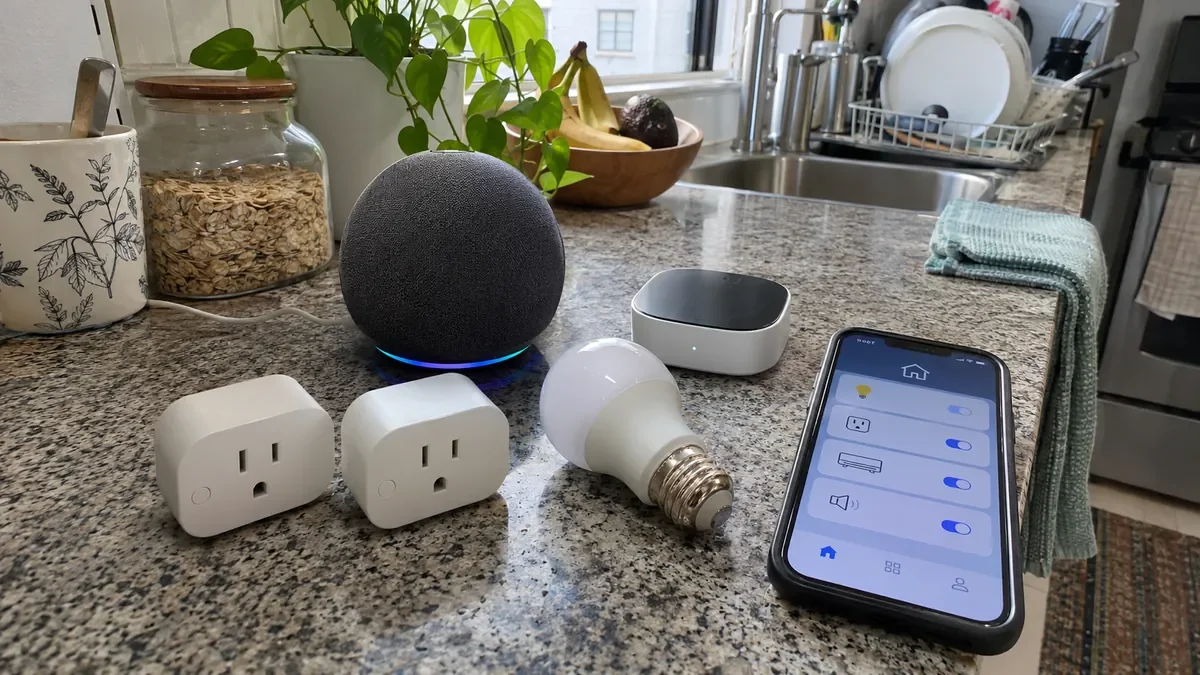
- Pick one voice assistant and stick with it. The usual choices are Alexa and Google Home, and Apple Home if you use iPhones. Anything you buy afterward should work with your pick. A smart speaker also works as a hub for many Wi-Fi and Matter devices, and some models include a Thread border router, so check the spec before buying a separate hub.
- Check your Wi-Fi first. Many smart plugs and bulbs only use 2.4 GHz Wi-Fi. If the building’s network blocks new devices, you want to find out before you buy a kit. Test with one cheap plug first.
- Add smart plugs for the worst energy offenders. Start with the TV and game console, chargers, and anything you forget to turn off. A plug turns an ordinary appliance into a scheduled one. For a full explanation, see What Is a Smart Plug? How It Works & What Renters Can Do With One.
- Swap the four bulbs you use most. Smart bulbs screw in like any other, need no permission, and go with you. If your rental already has LEDs, the saving comes from schedules and auto-off.
- Handle cooling without touching the thermostat. If you have a window or portable AC, or a mini-split with a remote, a smart AC controller that sticks on the wall and mimics the remote can add scheduling and phone control without any wiring.
- Add leak sensors where water lives. Battery sensors sit under the sink, behind the toilet and next to the washer, and alert your phone when they get wet. They need no tools and no permission.
- Add a lock only with written permission. Retrofit locks that replace just the inside thumb turn keep your original key and outer cylinder, which is easier to reverse than swapping a deadbolt. Ask in writing first, keep the original part in a labeled bag, and see Renter-Friendly Home Security Systems (No Drilling, No Contract) for other no-drill security choices.
- Build one routine, then stop. A single “good night” routine that turns off plugs, dims lights and locks up is plenty. Live with it for a week before adding more.
Green Smart Home Devices for Renters
Green smart home devices for renters are the same plugs, bulbs and controllers as above, used to stop paying for energy you are not using. This angle matters for tenants because you cannot add insulation or replace windows, so devices are among the few efficiency tools you control.
Smart plugs cut standby waste. The U.S. Department of Energy says standby power accounts for about 5% to 10% of residential energy use. A plug on a schedule can shut off a TV setup or chargers overnight. A smart power strip is another option, and EnergySage lists them at roughly $15 to $40.
LED bulbs use far less energy. The Department of Energy says LEDs use at least 75% less energy than incandescent bulbs, and ENERGY STAR says certified LEDs use up to 90% less. If you are replacing old incandescents, the saving is significant. If your rental already has LEDs, the “smart” part helps by turning bulbs off in empty rooms.
A smart thermostat or AC controller helps with heating and cooling. ENERGY STAR says its certified smart thermostats cut heating and cooling bills by more than 8% on average, about $50 a year, and about $100 a year in homes that are empty much of the day. If you cannot replace the thermostat, a smart AC controller aims at the same waste for window and mini-split units, though the saving depends on how you use the AC.
Leak sensors save water and deposits. A slow leak under a sink can run for weeks before anyone notices. An early alert protects your deposit as well as the water bill.
Motorized shades can reduce heat gain. Closing shades on a sunny afternoon lowers cooling load. If you are considering them, no-drill options are covered in the blinds guides on this site.
One more point rarely mentioned: every extra hub, bridge and charger draws power all day. Choose devices that connect directly over Wi-Fi or Matter where you can, and skip boxes you do not need.
What Does a DIY Smart Rental Cost? Worked Math
The U.S. Energy Information Administration expects the 2026 residential average to be about 18.2 cents per kilowatt-hour. These examples use that rate. Your own rate may differ, so swap it in.
Starter setup cost. A smart speaker, one or two plugs and a 4-pack of smart bulbs typically costs roughly $100 to $200 total, depending on brand and sales. The ranges move, so check live prices.
Example 1: swapping incandescent bulbs for LEDs. A 60-watt incandescent replaced by a 9-watt LED saves 51 watts. At 3 hours a day, that is 1,095 hours a year, so 51 watts x 1,095 hours is about 55.8 kWh. At 18.2 cents, that is about $10.16 a year per bulb, or about $40.66 for four. If you already use LEDs, skip this saving.
Example 2: standby power. Take an apartment that uses 6,000 kWh a year. At the 5% low end of the DOE range, standby power is 300 kWh, or $54.60 a year. If smart plugs cut half of that, you save about 150 kWh, or $27.30 a year.
Example 3: heating and cooling. ENERGY STAR’s average figure for a smart thermostat is about $50 a year. For a renter who cannot change the thermostat, an AC controller might save a similar amount if you tend to leave the AC running when nobody is home, though this is an estimate, not a measured result for any specific product.
Putting it together. Lights plus plugs save about $40.66 + $27.30 = $67.96 a year. A $150 starter setup would pay back in about 2.2 years ($150 divided by $67.96). Honest caveats: this only holds if you were using incandescents and did have idle electronics, and your real number depends on your rate, your habits and your climate. Convenience, leak alerts and remote control are the other half of the value.
Landlord, Lease and Deposit – What You Can Add Without Asking
The lease decides what you may do. Search yours for “alterations”, “fixtures” and “modifications.” In most leases, plug-in, battery-powered and freestanding items are not alterations. Anything that replaces a fixture or attaches to the building usually is.
- No permission needed (in most leases): smart plugs, smart bulbs, a speaker, leak sensors, a stick-on AC controller, and a battery camera placed inside your own space. Read the lease if you are unsure.
- Written permission needed: thermostats, locks, switches and shower heads. Ask by email, promise to restore the original at move-out, and keep the original part labeled.
- Shared Wi-Fi caveat: some buildings run managed networks that block new devices or isolate each apartment. Check before you buy.
- Cameras: an indoor camera that watches your own space is your decision. A camera pointed at a hallway, neighbor’s window or shared area can cause disputes and may break local rules, so aim it only at your own door or room.
- Deposit: smart devices tend to protect your deposit more than they threaten it. Leak sensors catch damage early. The risk comes from fixtures you swapped and did not restore.
Move-out checklist. Factory reset every device. Remove each one from your accounts (Alexa, Google Home, lock app, camera app). Reinstall any original thermostat, lock part or bulbs. Photograph everything and send the landlord a short note listing what you restored. Do it a day early.
A Short Email to Send Before You Sign
Put your smart-home questions in writing so you have answers on record. Here is a template you can adapt:
Hi [Name], I’m interested in the unit at [address] and saw it has smart features. Before I sign, could you confirm a few things? Whose account are the lock, thermostat and hub registered to, and will I get my own login? Are the lock codes and thermostat schedules cleared between tenants? Are there any cameras or microphones inside the unit? Is there a monthly fee for the smart package, and is it optional? Am I allowed to add my own plug-in smart devices, such as plugs and bulbs? And what do you need me to reset or return at move-out? Thank you, [Your name]
A landlord who answers clearly and quickly is usually one who has thought about these issues. Vague replies, or an answer that changes between emails, are useful information too.
Privacy – What a Landlord Can See in a Smart Rental
In a landlord-run system, the account holder may be able to see lock activity, thermostat settings or sensor alerts, depending on the vendor and what the property enabled. Laws on tenant privacy and recording differ by state, province and country, so this guide cannot say what is allowed where you live. What you can do is ask what data is collected, who can view it, and how long it is kept, and confirm that no recording happens inside your unit. Keep your own devices on your own accounts, and use a separate guest network for smart gadgets if your router supports one. If you ever feel a system is being used to monitor you, a local tenant union or legal aid office can explain your options.
What to Do If the Landlord’s Smart System Stops Working
Landlord-run systems fail too: a hub loses power, a lock’s batteries die, or the property changes vendors. Keep a written record of outages with dates, so you can ask for a fix or a rent conversation if a paid feature goes down. Never force or tamper with a lock or building device yourself. If you are locked out, contact the property’s emergency line first, and keep a physical key or a code you control as your fallback. For troubleshooting your own devices, the brand-neutral steps in smart home troubleshooting apply to the gadgets you own.
Mistakes to Avoid With Smart Rentals
- Buying a hub before a device. A speaker often covers hub duties, so buy the speaker first and add a hub only if a device truly needs one.
- Swapping a fixture without written permission. An unapproved thermostat or lock swap is a common cause of deposit disputes.
- Accepting an indoor camera. Ask for it to be removed before you sign.
- Buying a full kit for a building with bad Wi-Fi. Test one plug first. Thick walls and managed networks can ruin a batch of devices.
- Paying a monthly smart fee for devices you cannot control. Ask what the fee covers and whether it is optional.
- Automating everything on day one. Start with one routine and add more slowly.
FAQ – Smart Homes for Rent
What does smart homes for rent mean?
It usually means a rental where the landlord has installed smart devices such as a lock, a thermostat and a hub. It can also be used as a search phrase by renters who want to know how to make their own rental smart. Ask who owns and controls the devices before you sign.
Can I make a rental smart without my landlord’s permission?
For plug-in, battery-powered and freestanding devices, usually yes. Smart plugs, bulbs, speakers, leak sensors and stick-on controllers are not alterations in most leases. Anything that replaces a fixture, such as a thermostat or lock, needs written permission.
What is the cheapest way to make a rental smart?
Start with two smart plugs and a 4-pack of smart bulbs, and control them from your phone. Add a speaker later for voice control. Test one plug on your Wi-Fi before buying more.
Which green smart home devices actually save renters money?
Energy-monitoring or scheduled smart plugs for standby power, LED smart bulbs if you are replacing old incandescents, and a smart thermostat or AC controller for heating and cooling. Savings depend on your rate and habits, so use the worked math above with your own numbers.
What happens to my smart devices when I move out?
Yours come with you. Reset them, remove them from your accounts, and pack them. The landlord’s devices stay, so hand back codes and reinstall any original parts you removed.
Is a smart lock safe to use in a rental?
It can be, with conditions. Use a retrofit lock that leaves the original key and outside hardware in place, get written permission first, keep the original part, and always keep a physical key as a backup.
Conclusion – Your Next Step
Smart homes for rent can be a perk when the devices are on your account, nothing is recorded inside your unit, and there is no surprise fee. When they are not, a small kit of your own gives you the same convenience with more control. Ask the checklist questions before you sign, start with plugs and bulbs, and get written permission for any fixture swap. For your first purchases, read Smart Home for Renters: What to Buy First (No Drilling).
Sources: SmartRent resident and hardware pages; iApartments comparison blog (March 2026); U.S. Department of Energy and ENERGY STAR efficiency guidance as summarized by EnergySage and ENERGY STAR; U.S. Energy Information Administration Short-Term Energy Outlook. Checked November 2026.
